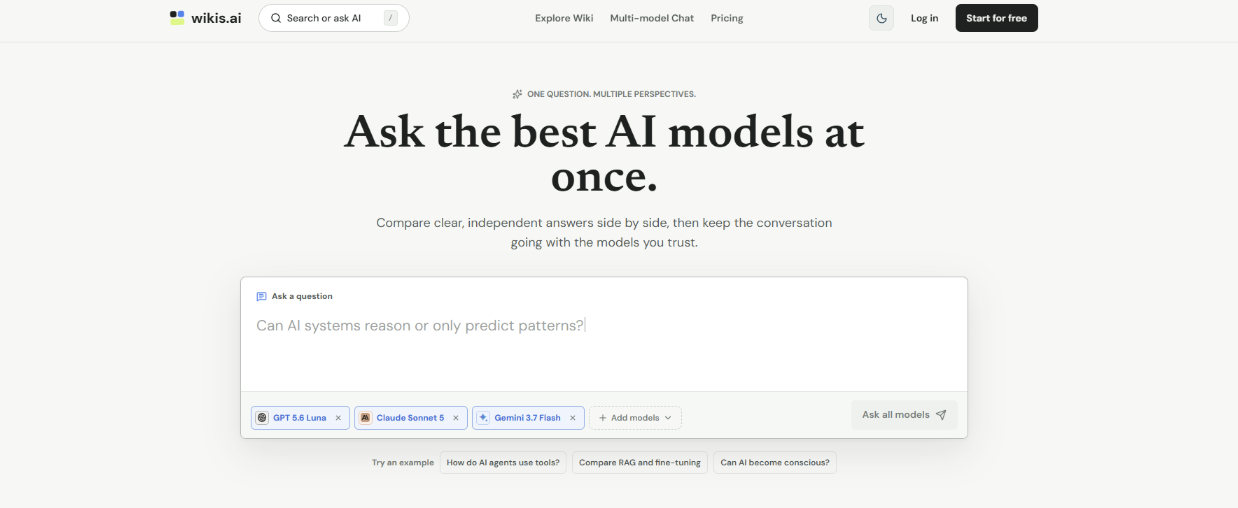
Information overload is a real problem today. We save endless links, write scattered notes, and lose track of important data. I recently spent some time testing Wikis AI to see if it could solve this issue.
This is not a promotional pitch. I want to share my actual experience with the platform. I will cover what works well, what falls short, and who should consider using it.
Most of us use traditional note-taking apps. We dump text into folders and hope we can find it later. A McKinsey report states that workers spend 20% of their time just searching for internal information.
That data point reflects my daily struggle perfectly. I had Google Docs, local text files, and saved bookmarks scattered everywhere. I needed a system that actually understood my notes.
I realized static pages were no longer enough. I needed a dynamic system to organize my thoughts. This is when I decided to test an AI Wiki to see if machine learning could fix my messy workflow.
Wikis AI claims to make information retrieval conversational and intuitive. I wanted to see if it lived up to this promise. Here is a breakdown of its primary features based on my usage.
The platform tries to organize data for you automatically. You paste in raw text or links. The system then analyzes the context and categorizes the information.
This feature is quite functional for daily use. It removes the friction of manually creating folders and sub-folders. However, it sometimes misinterprets highly technical jargon.
This is the standout feature of the tool. You do not search by exact keywords anymore. Instead, you ask the system direct questions about your saved documents.
It feels like talking to a research assistant. If I ask, "What were my notes on the Q3 marketing budget?" it generates a summary. It pulls the exact data instead of just giving me a file link.
Wikis AI connects related concepts in the background. It finds relationships between different notes without manual tagging. This creates a web of knowledge rather than a rigid list.
I found this particularly useful for long-term projects. I often forget how a note from January relates to a task in June. The platform highlights these hidden connections nicely.

Testing a new tool always comes with a learning curve. I approached Wikis AI with a healthy dose of skepticism. Here is what the actual user experience feels like.
Getting started is surprisingly straightforward. I created an account at Wikis AI in just a few clicks. The onboarding process is minimal and clean.
I uploaded about twenty different documents to start my test. The processing time was reasonable. It took a few minutes for the system to index everything properly.
Using the tool daily changed my search habits. I stopped looking through folders completely. I just typed my questions into the search bar.
The responses are usually accurate and cite the original note. Building a reliable AI Wiki requires trust in the output. For the most part, the system delivers factual summaries based strictly on my inputs.
No software is perfect. After spending considerable time with Wikis AI, I noticed distinct strengths and weaknesses. Here is an objective look at both sides.
The user interface is minimalist and distraction-free. It does not overwhelm you with unnecessary buttons. The core focus remains firmly on your text and the search bar.
The time saved on retrieving information is measurable. I no longer open five different tabs to find one specific statistic. The conversational search is genuinely helpful for quick answers.
The system relies heavily on the quality of your prompts. If you ask a vague question, you get a vague answer. There is a slight learning curve to asking the right questions.
I also noticed occasional AI hallucinations. Very rarely, it would combine two separate notes into a slightly confusing summary. You still need to double-check important facts.
Furthermore, offline access is currently a limitation. You need an active internet connection to interact with the database. This might deter users who travel frequently.
Wikis AI is not a universal solution for everyone. It serves a specific demographic very well. Other users might find it unnecessary for their needs.
Independent researchers and writers will benefit greatly. If you consume and synthesize large amounts of text, this tool is highly practical. It acts as an excellent digital brain.
Small teams working on complex projects should also consider it. It helps keep everyone on the same page. It prevents knowledge from getting lost in endless chat channels.
Casual users who just write simple grocery lists do not need this. The advanced features will be overkill. A basic notes app is still better for simple tasks.
Massive enterprises might also struggle with it right now. They usually require heavy custom integrations and strict on-premise security. This tool currently feels better suited for individuals and agile teams.
We are witnessing a shift in how we handle data. The traditional database model is becoming outdated. The future belongs to interactive information systems.
We no longer want to just store data. We want to converse with our data. This transition from static to dynamic interaction is crucial for modern productivity.
This is why the concept of an AI Wiki is gaining so much traction globally. It bridges the gap between raw data storage and actionable insights. Wikis AI is a clear example of this evolving trend.
My time with Wikis AI has been largely positive. It successfully solves the core problem of information retrieval. The conversational search feature is a significant upgrade over traditional folders.
However, it requires a shift in your mindset. You have to learn how to ask your database questions. You also have to accept the occasional imperfections of machine learning.
If you are tired of losing track of your own notes, it is worth exploring. You can form your own opinion by visiting their platform. It might just change how you organize your digital life.
 AI tools to find & convert leads.
  Send emails at scale